Algorithm guide
Floyd-Steinberg Dithering Online
Floyd-Steinberg dithering online is the fastest way to apply the most widely used error diffusion algorithm to your photos and graphics. Diffused Editor runs Floyd-Steinberg entirely in your browser — free, private, and with a live preview you can tune in real time.
Quick answer: Floyd-Steinberg dithering online is the most widely used error diffusion method — natural gradients for photos with balanced dot patterns. Apply it free in Diffused Editor with live preview and client-side privacy.
What is Floyd-Steinberg dithering?
Floyd-Steinberg is an error diffusion algorithm published by Robert Floyd and Louis Steinberg in 1976. It solves a fundamental problem: when you reduce an image to a limited palette, simple rounding destroys gradients and creates flat color bands. Error diffusion preserves the appearance of smooth tones by spreading quantization error to neighboring pixels that have not yet been processed.
The algorithm scans the image left to right, top to bottom. For each pixel, it finds the nearest color in the palette, calculates the difference (the error), and distributes that error to adjacent unprocessed pixels using a fixed kernel: 7/16 to the right, 3/16 to the bottom-left, 5/16 below, and 1/16 to the bottom-right. The result is a natural, organic dither pattern that the human eye reads as continuous tone.

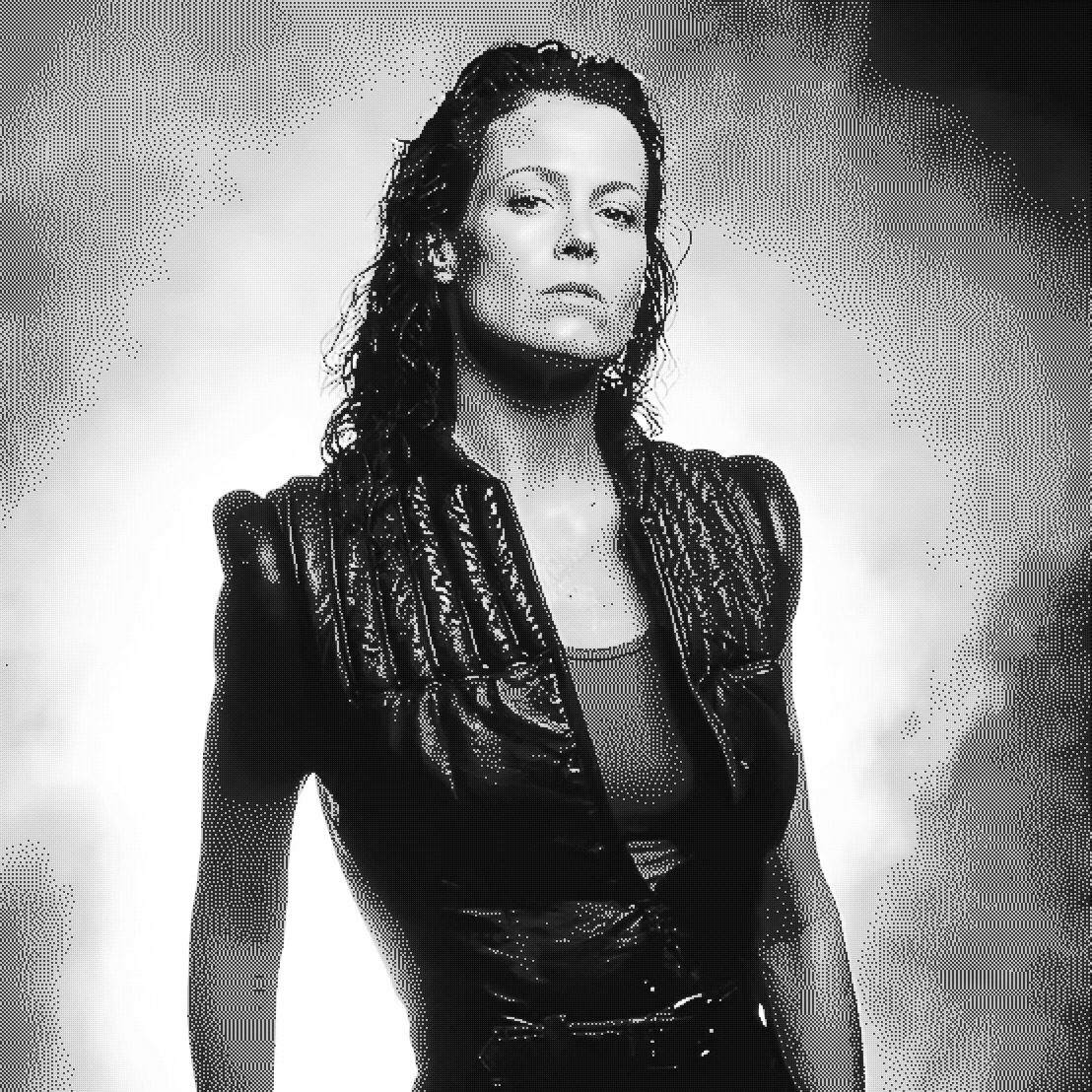
How Floyd-Steinberg differs from other dithering methods
Error diffusion algorithms like Floyd-Steinberg process pixels sequentially and carry error forward. Ordered dithering (such as Bayer matrix) applies a fixed threshold pattern independently at each pixel — producing geometric crosshatch grids. Atkinson dithering is also error diffusion, but it spreads error to a wider neighborhood while retaining only 75% of the error, creating a lighter, more open pattern.
Floyd-Steinberg sits in the middle: it is the reference standard for error diffusion. Most other diffusion variants (Sierra, Stucki, Burkes, Jarvis-Judice-Ninke) modify the kernel weights or neighborhood size to trade smoothness against detail. When you apply Floyd-Steinberg dithering online, you get the algorithm that countless print systems, indexed-color converters, and graphics tools have used for nearly fifty years.
When to use Floyd-Steinberg dithering
Floyd-Steinberg is the best default choice for most images. Reach for it when:
- Photographs — portraits, landscapes, and product shots with smooth tonal transitions
- General-purpose dithering — when you are unsure which algorithm to pick (or click Auto-Tune)
- Grayscale and 1-bit conversion — high-contrast black-and-white with preserved mid-tone detail
- Indexed-color game assets — reducing color depth while keeping gradient appearance
- Print prep — a balanced dither base before applying additional halftone effects
Skip Floyd-Steinberg when you want a specific aesthetic: Atkinson for retro Mac 1-bit graphics, Ordered Bayer for geometric halftone grids, Blue Noise for film-grain texture, or Diffusion Dots for newspaper dot patterns.
How to apply Floyd-Steinberg dithering online
You can run Floyd-Steinberg dithering online in Diffused Editor without installing software or uploading your image to a server:
- Open the editor — go to diffusededitor.com in Chrome, Firefox, Safari, or Edge.
- Upload your image — drag and drop, click to browse, or paste from clipboard (Ctrl/Cmd+V).
- Select Error Diffusion (Floyd-Steinberg) — open the Style tab and choose "Error Diffusion (Floyd-Steinberg)" from the algorithm dropdown. Or click Auto-Tune and let the editor pick it for you.
- Tune settings — adjust intensity (try 80–120%), color count (2–64), threshold, brightness, and contrast. Use the A/B divider to compare against the original.
- Download — export a free 50% JPEG or upgrade to Pro for full-resolution PNG, WebP, and JPEG.
Tips for better Floyd-Steinberg results
A few adjustments make a noticeable difference:
- Intensity at 100–120% — slightly above default strengthens the dither pattern without overwhelming detail
- Palette extraction — let the editor pull colors from your image rather than forcing a generic palette
- Grayscale toggle — for black-and-white results, enable Grayscale in the Color tab before dithering
- Contrast boost — add +10 to +20 contrast in the Adjust tab for more dramatic 1-bit looks
- Pattern size 1 — keep at 1 for maximum detail; increase only for a coarser, more visible pattern
Why run Floyd-Steinberg in the browser?
Desktop tools like Photoshop can apply Floyd-Steinberg through indexed color conversion, but that requires a subscription and local installation. Cloud converters upload your file and offer limited controls. Diffused Editor gives you dedicated Floyd-Steinberg dithering with full parameter control, live preview, and client-side privacy — your image never leaves your device.
For a broader overview of dithering techniques, see our image dithering guide. For a step-by-step walkthrough of the full editor, read how to dither an image online.
Frequently asked questions
What is Floyd-Steinberg dithering?
An error diffusion algorithm that quantizes each pixel and spreads the rounding error to neighboring unprocessed pixels, creating smooth perceived gradients in a limited palette.
Can I use Floyd-Steinberg dithering online for free?
Yes. Diffused Editor includes Floyd-Steinberg in the free tier as "Error Diffusion (Floyd-Steinberg)." No account or upload required.
When should I use Floyd-Steinberg instead of Atkinson or Bayer?
Use Floyd-Steinberg for photographs and smooth gradients. Choose Atkinson for retro Mac aesthetics and Ordered Bayer for geometric halftone patterns.
Try Floyd-Steinberg dithering now — free, private, live preview.
Open Diffused EditorExplore all algorithms in our image dithering guide.